
Workflow-action design note
Factory workflow design should define the action loop before the dashboard is built. AI is useful only when a signal reaches the right owner, with a clear response window, evidence rule, and escalation path that the factory can repeat during a normal production shift.
Dashboards are mistaken for action loops
The common mistake is to treat a dashboard as the workflow. More charts do not improve production if no one knows who investigates an abnormal signal, which evidence is trusted, when to stop the line, and how the correction is recorded for the next shift.
Checks before funding AI workflow dashboards
- What exact decision will change when the AI signal appears?
- Who owns first response, verification, escalation, and closeout?
- Can the factory prove that the action loop reduces delay, rework, missed replenishment, quality escape, or supervisor overload?
Proof requests for workflow-design vendors
- Show the alert-to-action workflow, including role ownership and time limits, not only dashboard screenshots.
- Demonstrate how false alarms, missing data, late updates, and conflicting signals are handled.
- Provide an action log that connects AI recommendations to accepted, rejected, delayed, and corrected decisions.
Signal-to-action gate
GO if the dashboard creates a repeatable action loop. HOLD if the signal is useful but owner discipline is weak. REDESIGN if the factory is buying visibility without changing decision behavior.
Factory workflow design is the missing layer in many factory AI projects.
A workflow should make the AI signal accountable: one owner, one response window, one evidence trail, and one escalation path that can survive a normal shift handover.
Many factories believe the next step toward AI is another dashboard: a production dashboard, a quality dashboard, a maintenance dashboard, a planning dashboard, or a real-time performance dashboard.
These tools can be useful. But a dashboard does not improve a factory by itself.
A dashboard shows information. A factory improves only when people see the right signal, understand what it means, act on it, and record whether the action worked.
Before a factory adds more AI dashboards, it needs to answer a more practical question:
When AI finds a problem, who changes what?
Without that answer, the factory may become more digital, but not more operationally effective.
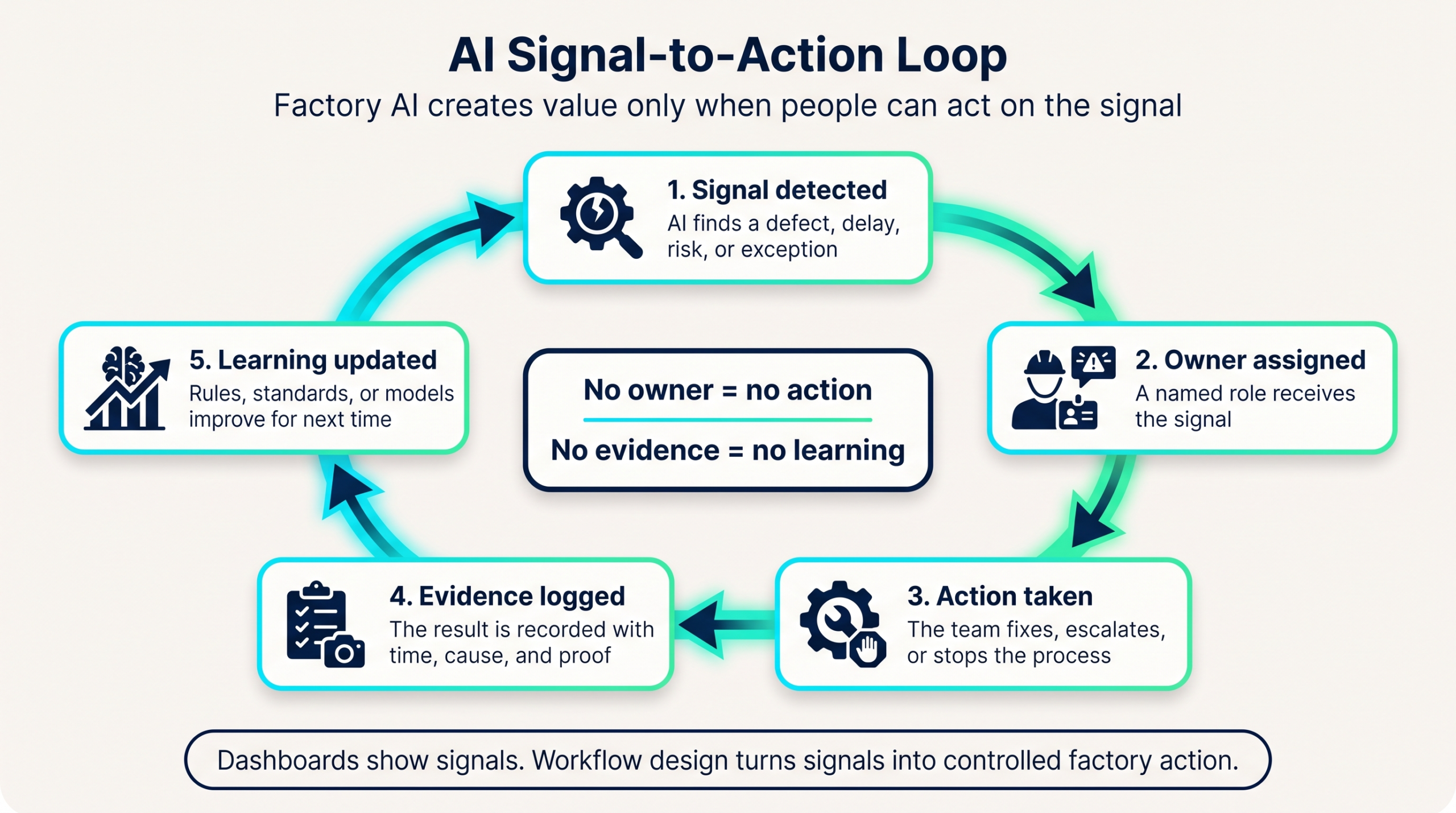
1. A Dashboard Is Not the Same as a Workflow
A dashboard is a display layer.
It can show output, defects, downtime, work-in-progress, energy use, late orders, machine status, or quality trends. But it does not automatically decide what should happen next.
A workflow is different. In practical terms, factory workflow design is the operating layer between AI visibility and factory action.
A workflow defines:
- who sees the signal,
- when they see it,
- what decision they are expected to make,
- who is responsible for action,
- how the action is recorded,
- and how the factory checks whether the problem was actually solved.
This is why factory workflow design matters before AI dashboards become too complex.
A dashboard without workflow design often creates more visibility without more discipline. People can see the problem, but no one owns the next step.
2. More Data Can Create More Confusion
Many factory AI projects begin with a simple idea:
If we can see the data, we can improve the factory.
That is partly true. But it is incomplete.
More data can also create confusion when the factory has not defined how signals become action.
For example:
- A production dashboard shows that output has dropped.
- A quality dashboard shows a defect spike.
- A maintenance dashboard shows repeated stoppages.
- A planning dashboard shows schedule risk.
- An AI alert suggests an abnormal pattern.
Each signal may be useful. But if every department reads the signal differently, the factory does not move faster.
Production may see a labor issue. Quality may see a process-control issue. Maintenance may see a machine issue. Planning may see a schedule issue. Management may see a KPI issue.
The data is visible, but the response is fragmented.
This is not a dashboard problem. It is a factory workflow design problem.
3. Every AI Signal Needs an Owner
One of the most important rules in factory AI is simple:
Every AI signal needs an owner.
If an AI system detects a risk, someone must be responsible for reviewing it.
If a dashboard shows an abnormal trend, someone must decide whether it requires action.
If a problem is escalated, someone must confirm whether the action worked.
Without ownership, AI alerts become digital noise.
This is especially important for Physical AI in smart manufacturing, where factory signals only create value when someone or something can respond correctly in the real workflow.
In a real factory, ownership cannot be vague. It must be operational.
Factory leaders should define:
- who checks the alert first,
- whether the first reviewer is a supervisor, engineer, planner, quality leader, or maintenance technician,
- when the issue should be escalated,
- what evidence must be attached,
- what response time is expected,
- and how the action is closed.
These questions are not technical details. They are the foundation of factory workflow design.
4. Human-in-the-Loop Is Not Just a Compliance Phrase
Many AI discussions use the phrase “human-in-the-loop.”
In factory operations, this should not be treated as a general statement. It must be designed into the workflow.
Human-in-the-loop means the factory knows:
- which decisions AI can support,
- which decisions humans must approve,
- which actions can be automated,
- which actions require supervisor judgment,
- and which risks must be escalated before action.
For example, an AI system may detect a possible quality abnormality. But the factory still needs human judgment to decide whether it is a false alarm, a process issue, a material issue, a training issue, or an inspection-standard issue.
AI may help find the signal. The workflow determines whether the factory responds correctly.
5. Factories Need Action Loops, Not Just Reporting Layers
A reporting layer answers one question:
What happened?
An action loop answers a stronger operational question:
What should we do now, who will do it, and how will we confirm it worked?
That difference is critical.
A strong factory AI workflow should include four basic loops:
- Signal: What did the system detect?
- Decision: Who reviews the signal and decides the response?
- Action: Who changes the process, schedule, setting, staffing, maintenance plan, or inspection method?
- Verification: How does the factory confirm that the action solved the problem?
This loop is simple, but many factories skip it.
They invest in dashboards first and workflow design later. The result is often a digital display of old problems.
6. A Practical Example: Output Drop on a Production Line
Imagine a factory dashboard shows that one production line is falling behind target.
The dashboard may show:
- hourly output,
- planned quantity,
- actual quantity,
- gap to target,
- operator attendance,
- machine stoppage,
- quality rejection,
- and work-in-progress status.
This information is useful. But the factory still needs workflow design.
The key questions are:
- Who checks the output gap first?
- At what threshold does the issue become urgent?
- Should the supervisor investigate method, manpower, machine, material, or quality?
- Should engineering review process balance?
- Should maintenance check repeated machine stoppage?
- Should planning adjust the schedule?
- Should quality check whether rework is creating hidden capacity loss?
- Where is the final action recorded?
Without this workflow, the dashboard only shows that the line is behind.
With workflow design, the dashboard becomes part of a factory action system.
7. Why Factory AI Projects Fail Without Workflow Design
Factory AI projects often fail for practical reasons, not because the technology is impossible.
Common problems include:
- alerts with no clear owner,
- dashboards with too many metrics,
- managers reviewing data too late,
- supervisors receiving signals they cannot act on,
- departments interpreting the same data differently,
- no escalation rule,
- no evidence trail,
- no verification after action,
- and no feedback loop to improve the AI system.
These are workflow problems.
AI can make these problems more visible, but it cannot automatically fix them.
That is why factories should not treat AI dashboards as the final goal. Dashboards should support a designed decision workflow.
Factory Workflow Design Questions Before Adding More AI
Before adding another AI dashboard, factory leaders should ask seven questions.
1. What decision will this dashboard improve?
If the answer is unclear, the dashboard may become another reporting screen.
2. Who is the primary user?
A plant manager, line supervisor, quality engineer, planner, and maintenance team do not need the same view.
3. What action should happen when a metric changes?
A metric without a response rule is only information.
4. What is the escalation path?
Factories need clear rules for when a problem moves from operator to supervisor, from supervisor to manager, or from one department to cross-functional review.
5. What evidence should be recorded?
If the factory cannot record what happened and what was done, it cannot learn from the signal.
6. How will the factory know the action worked?
Without verification, the dashboard may show activity, not improvement.
7. How will the workflow improve over time?
AI systems should not only detect problems. They should help the factory learn which responses work, which alerts are useful, and which rules need to be improved.
These questions turn factory AI from a visibility project into an operating system. They also make factory workflow design measurable instead of abstract.
The Real Goal: From Data Visibility to Operational Discipline
The best factory AI systems are not only technical systems.
They are operating systems for better factory discipline.
They help people see earlier, decide faster, act more consistently, and learn from repeated problems.
That requires more than dashboards.
It requires:
- clear ownership,
- simple decision rules,
- practical escalation paths,
- evidence capture,
- feedback loops,
- and workflow design around real factory behavior.
This is especially important in labor-intensive manufacturing, where many problems are not solved by one machine setting or one software rule.
A factory is a human system as much as a technical system.
AI should strengthen that system, not bypass it.
How This Connects to Factory AI Readiness
Factory workflow design should be treated as part of AI readiness. Without factory workflow design, even a well-built dashboard can become a passive reporting layer.
A factory may have sensors, dashboards, tablets, cloud systems, and AI tools. But if signals do not become owned decisions and verified actions, the system will struggle to create operational value.
This is why factories should connect workflow design with practical readiness checks such as Factory AI Readiness Checklist, early-stage Factory AI Smoke Tests, responsible handling of Private Factory Data, and the human capability layer behind the Operator Skill Matrix.
The goal is not to add more digital screens. The goal is to make the factory better at acting on the signals it already has.
Source anchors for responsible workflow AI
This article uses public source anchors for responsible AI and process discipline. The NIST AI Risk Management Framework is useful for thinking about AI risk, accountability, and monitoring. The OECD AI Principles reinforce human-centered and accountable AI. ISO’s overview of ISO 9001 quality management supports the process approach and continual improvement mindset behind practical factory workflow design.
Final workflow-design takeaway
Factory AI does not create value because a dashboard exists.
It creates value when the factory has a workflow that turns signals into decisions, decisions into actions, and actions into verified improvement.
Before buying another dashboard, factories should ask:
Do we know who acts when the system finds a problem?
If the answer is no, the next investment should not be another screen.
It should be factory workflow design.
For long-term AI adoption, factory workflow design is not a side task. It is the structure that helps people turn AI signals into daily operational discipline.
External validation anchors for factory workflow design
- NIST AI Risk Management Framework — useful for grounding AI workflow design in governance, risk, monitoring, and human accountability.
- NIST manufacturing resources — relevant for connecting dashboards to measurable production-system behavior.